# Data Types\Number\ Compare

### [![Responses_DataTypes_Numbers_Compare_Equals.png](https://simlab-soft.com/help/uploads/images/gallery/2024-08/responses-datatypes-numbers-compare-equals.png)](https://simlab-soft.com/help/uploads/images/gallery/2024-08/response-value-number-add.png) Equal (Number)

[![Ceiling Node.png](https://simlab-soft.com/help/uploads/images/gallery/2024-08/scaled-1680-/Agnimage.png)](https://simlab-soft.com/help/uploads/images/gallery/2024-08/add-node.jpg)
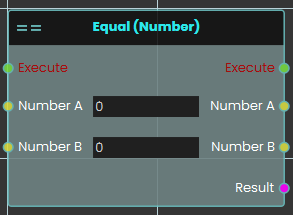
<div class="pointer-container" id="bkmrk-%C2%A0"><div class="pointer anim is-page-editable"><svg class="svg-icon" data-icon="link" role="presentation" viewbox="0 0 24 24" xmlns="http://www.w3.org/2000/svg"></svg><div class="input-group inline block"> <button class="button outline icon" data-clipboard-target="#pointer-url" title="Copy Link" type="button"><svg class="svg-icon" data-icon="copy" role="presentation" viewbox="0 0 24 24" xmlns="http://www.w3.org/2000/svg"></svg></button></div><svg class="svg-icon" data-icon="edit" role="presentation" viewbox="0 0 24 24" xmlns="http://www.w3.org/2000/svg"></svg></div></div>The **Equal (Number)** response enables the user to compare two values by either typing in a numerical value in the Number A and Number B fields or by attaching a value or a variable node to those ports. Then once the response is executed, the result of the comparison can be acquired through the **Result** port.

#### Example

[![image.png](https://simlab-soft.com/help/uploads/images/gallery/2024-08/scaled-1680-/S2himage.png)](https://simlab-soft.com/help/uploads/images/gallery/2024-08/S2himage.png)
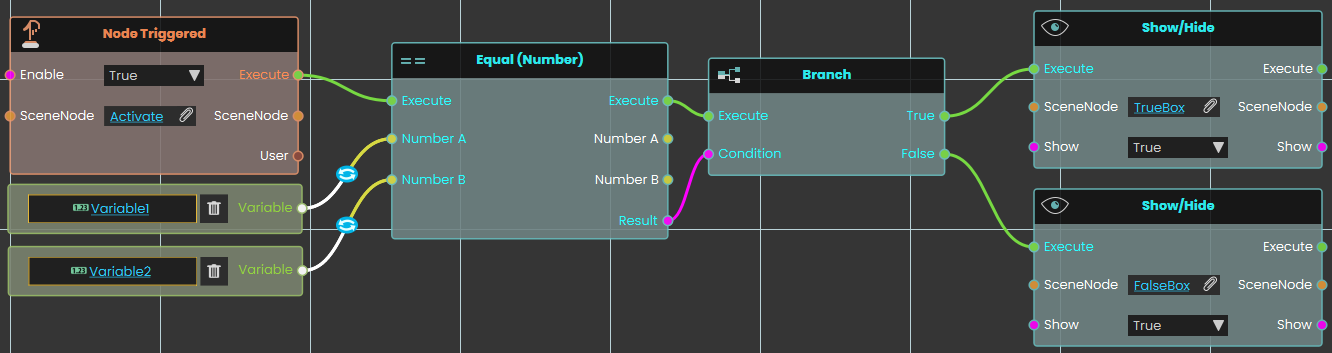
<div class="pointer-container" id="bkmrk-%C2%A0-1"><div class="pointer anim is-page-editable"><svg class="svg-icon" data-icon="link" role="presentation" viewbox="0 0 24 24" xmlns="http://www.w3.org/2000/svg"></svg><div class="input-group inline block"> <button class="button outline icon" data-clipboard-target="#pointer-url" title="Copy Link" type="button"><svg class="svg-icon" data-icon="copy" role="presentation" viewbox="0 0 24 24" xmlns="http://www.w3.org/2000/svg"></svg></button></div><svg class="svg-icon" data-icon="edit" role="presentation" viewbox="0 0 24 24" xmlns="http://www.w3.org/2000/svg"></svg></div></div>In this example, an **Equal Response** response is used to compare the value of Variable1 with the value of Variable2 once the user triggers the object named Activate. The result of the comparison can be acquired through the **Result** port. We have connected this Result port to the **Branch** node, and if the result of the branch is True, the TrueBox will show; if the result is False, the FalseBox will show.

---

### [![Responses_DataTypes_Numbers_Compare_Greater.png](https://simlab-soft.com/help/uploads/images/gallery/2024-08/responses-datatypes-numbers-compare-greater.png)](https://simlab-soft.com/help/uploads/images/gallery/2024-08/response-value-number-add.png) Greater

[![Ceiling Node.png](https://simlab-soft.com/help/uploads/images/gallery/2024-08/scaled-1680-/hBOimage.png)](https://simlab-soft.com/help/uploads/images/gallery/2024-08/add-node.jpg)

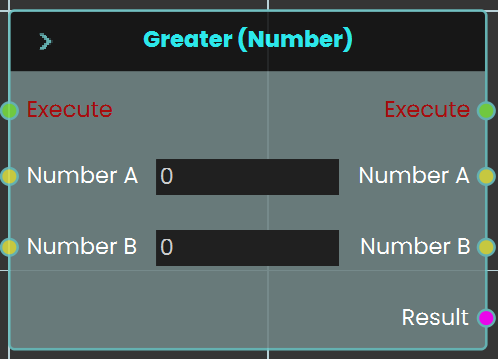
<div class="pointer-container" id="bkmrk-%C2%A0-4"><div class="pointer anim is-page-editable"><svg class="svg-icon" data-icon="link" role="presentation" viewbox="0 0 24 24" xmlns="http://www.w3.org/2000/svg"></svg><div class="input-group inline block"> <button class="button outline icon" data-clipboard-target="#pointer-url" title="Copy Link" type="button"><svg class="svg-icon" data-icon="copy" role="presentation" viewbox="0 0 24 24" xmlns="http://www.w3.org/2000/svg"></svg></button></div><svg class="svg-icon" data-icon="edit" role="presentation" viewbox="0 0 24 24" xmlns="http://www.w3.org/2000/svg"></svg></div></div>The **Greater** response enables the user to compare two values to determine if one is greater than the other by either typing in a numerical value in the Number A and Number B fields or by attaching a value or a variable node to those ports. Then once the response is executed, the result of the comparison can be acquired through the **Result** port.

#### Example

[![image.png](https://simlab-soft.com/help/uploads/images/gallery/2024-08/scaled-1680-/gMmimage.png)](https://simlab-soft.com/help/uploads/images/gallery/2024-08/gMmimage.png)
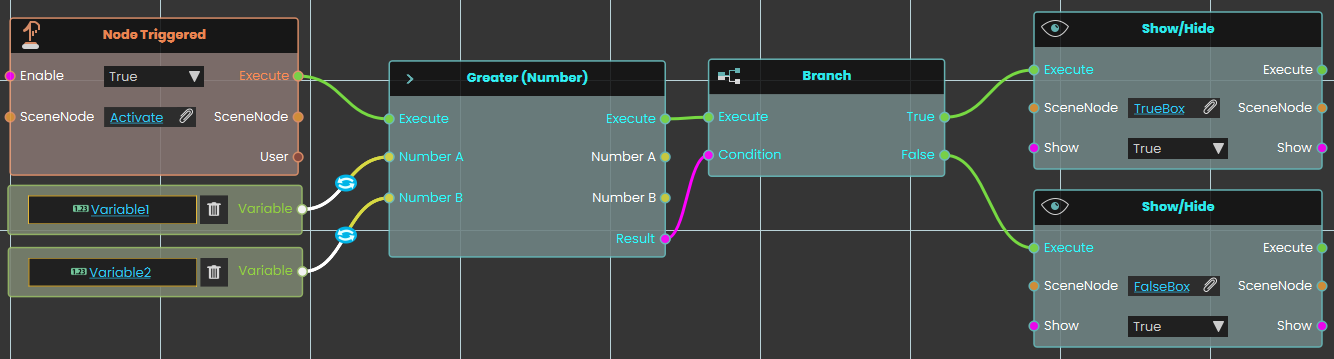
<div class="pointer-container" id="bkmrk-%C2%A0-7"><div class="pointer anim is-page-editable"><svg class="svg-icon" data-icon="link" role="presentation" viewbox="0 0 24 24" xmlns="http://www.w3.org/2000/svg"></svg><div class="input-group inline block"> <button class="button outline icon" data-clipboard-target="#pointer-url" title="Copy Link" type="button"><svg class="svg-icon" data-icon="copy" role="presentation" viewbox="0 0 24 24" xmlns="http://www.w3.org/2000/svg"></svg></button></div><svg class="svg-icon" data-icon="edit" role="presentation" viewbox="0 0 24 24" xmlns="http://www.w3.org/2000/svg"></svg></div></div>In this example, a **Greater Response** is used to compare the value of Variable1 with the value of Variable2 once the user triggers the object named Activate. The result of the comparison can be acquired through the Result port. We have connected this Result port to the Branch node, and if the result of the branch is True, the TrueBox will show; if the result is False, the FalseBox will show.

---

### [![Responses_DataTypes_Numbers_Compare_GreaterOrEqual.png](https://simlab-soft.com/help/uploads/images/gallery/2024-08/responses-datatypes-numbers-compare-greaterorequal.png)](https://simlab-soft.com/help/uploads/images/gallery/2024-08/response-value-number-add.png) Greater Or Equal 

[![Ceiling Node.png](https://simlab-soft.com/help/uploads/images/gallery/2024-08/scaled-1680-/hI8image.png)](https://simlab-soft.com/help/uploads/images/gallery/2024-08/add-node.jpg)

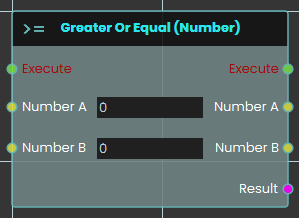
The **Greater Or Equal** response enables the user to compare two values to determine if one is greater than or equal to the other by either typing in a numerical value in the Number A and Number B fields or by attaching a value or a variable node to those ports. Then once the response is executed, the result of the comparison can be acquired through the **Result** port.

#### Example

[![image.png](https://simlab-soft.com/help/uploads/images/gallery/2024-08/scaled-1680-/dmcimage.png)](https://simlab-soft.com/help/uploads/images/gallery/2024-08/dmcimage.png)
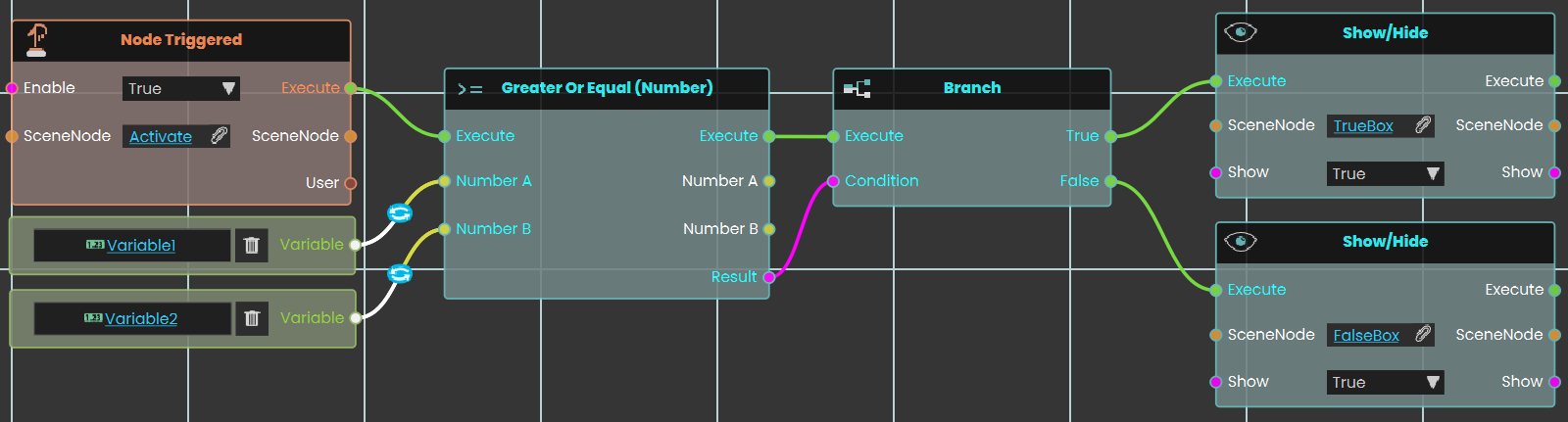
In this example, a **Greater Or Equal Response** is used to compare the value of Variable1 with the value of Variable2 once the user triggers the object named Activate. The result of the comparison can be acquired through the Result port. We have connected this Result port to the Branch node, and if the result of the branch is True, the TrueBox will show; if the result is False, the FalseBox will show.

---

### [![Responses_DataTypes_Numbers_Compare_Less.png](https://simlab-soft.com/help/uploads/images/gallery/2024-08/responses-datatypes-numbers-compare-less.png)](https://simlab-soft.com/help/uploads/images/gallery/2024-08/response-value-number-add.png) Less 

[![Ceiling Node.png](https://simlab-soft.com/help/uploads/images/gallery/2024-08/scaled-1680-/ye5image.png)](https://simlab-soft.com/help/uploads/images/gallery/2024-08/add-node.jpg)

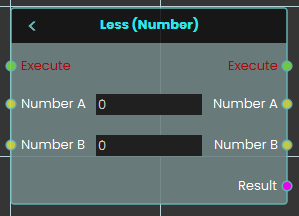
The **Less** response enables the user to compare two values to determine if one is less than the other by either typing in a numerical value in the Number A and Number B fields or by attaching a value or a variable node to those ports. Then once the response is executed, the result of the comparison can be acquired through the **Result** port.

#### Example

[![image.png](https://simlab-soft.com/help/uploads/images/gallery/2024-08/scaled-1680-/fxoimage.png)](https://simlab-soft.com/help/uploads/images/gallery/2024-08/fxoimage.png)
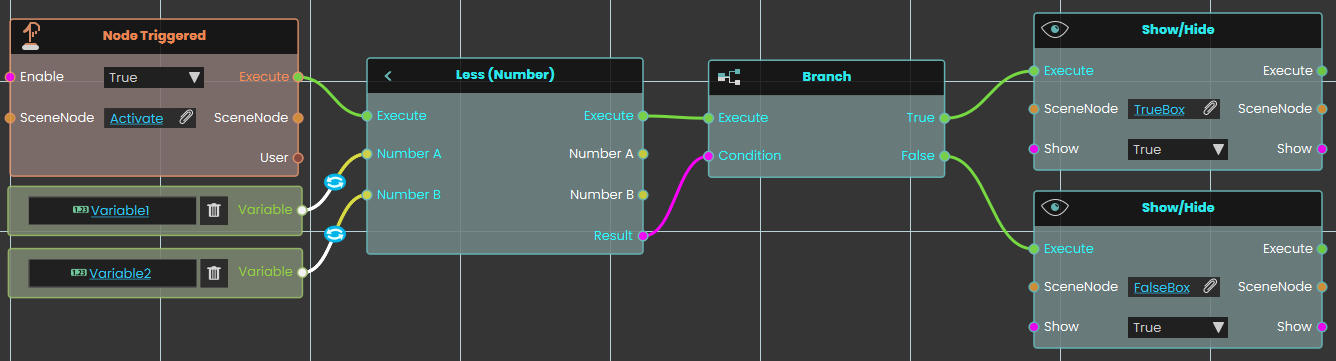
In this example, a **Less** is used to compare the value of Variable1 with the value of Variable2 once the user triggers the object named Activate. The result of the comparison can be acquired through the Result port. We have connected this Result port to the Branch node, and if the result of the branch is True, the TrueBox will show; if the result is False, the FalseBox will show.

---

### [![Responses_DataTypes_Numbers_Compare_LessOrEqual.png](https://simlab-soft.com/help/uploads/images/gallery/2024-08/responses-datatypes-numbers-compare-lessorequal.png)](https://simlab-soft.com/help/uploads/images/gallery/2024-08/response-value-number-add.png) Less Or Equal

[![Ceiling Node.png](https://simlab-soft.com/help/uploads/images/gallery/2024-08/scaled-1680-/q9simage.png)](https://simlab-soft.com/help/uploads/images/gallery/2024-08/add-node.jpg)

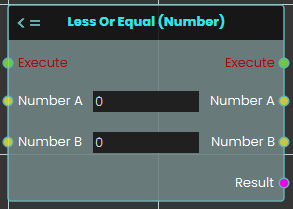
The **Less Or Equal** response enables the user to compare two values to determine if one is less than or equal to the other by either typing in a numerical value in the Number A and Number B fields or by attaching a value or a variable node to those ports. Then once the response is executed, the result of the comparison can be acquired through the **Result** port.

#### Example

[![image.png](https://simlab-soft.com/help/uploads/images/gallery/2024-08/scaled-1680-/V5nimage.png)](https://simlab-soft.com/help/uploads/images/gallery/2024-08/V5nimage.png)
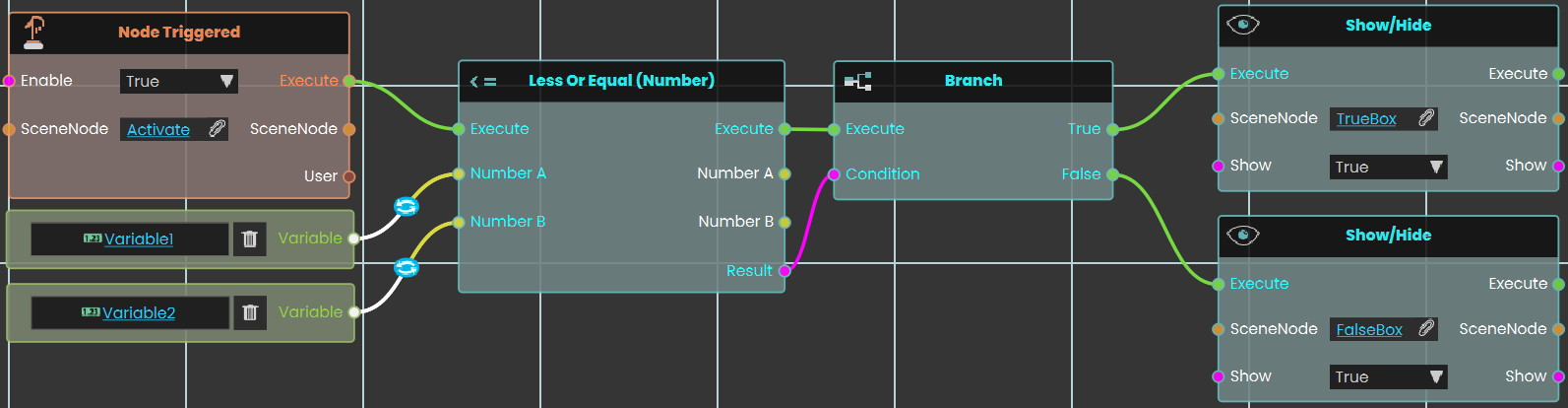
In this example, a **Less** is used to compare the value of Variable1 with the value of Variable2 once the user triggers the object named Activate. The result of the comparison can be acquired through the Result port. We have connected this Result port to the Branch node, and if the result of the branch is True, the TrueBox will show; if the result is False, the FalseBox will show.

---


### [![Responses_DataTypes_Numbers_Compare_NotEqual.png](https://simlab-soft.com/help/uploads/images/gallery/2024-08/responses-datatypes-numbers-compare-notequal.png)](https://simlab-soft.com/help/uploads/images/gallery/2024-08/response-value-number-add.png) Not Equal

[![Ceiling Node.png](https://simlab-soft.com/help/uploads/images/gallery/2024-08/scaled-1680-/3bBimage.png)](https://simlab-soft.com/help/uploads/images/gallery/2024-08/add-node.jpg)

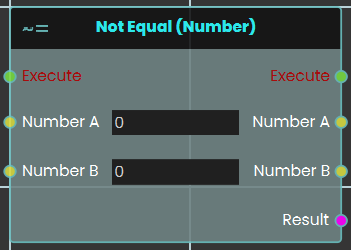
<div class="flex-shrink-0 flex flex-col relative items-end" id="bkmrk-%C2%A0-15"><div class="flex-shrink-0 flex flex-col relative items-end"><div><div class="pt-0"><div class="gizmo-bot-avatar flex h-8 w-8 items-center justify-center overflow-hidden rounded-full"><div class="relative p-1 rounded-sm flex items-center justify-center bg-token-main-surface-primary text-token-text-primary h-8 w-8"><div class="pointer-container" id="bkmrk-%C2%A0-19"><div class="pointer anim is-page-editable"><svg class="svg-icon" data-icon="link" role="presentation" viewbox="0 0 24 24" xmlns="http://www.w3.org/2000/svg"></svg><div class="input-group inline block"> <button class="button outline icon" data-clipboard-target="#pointer-url" title="Copy Link" type="button"><svg class="svg-icon" data-icon="copy" role="presentation" viewbox="0 0 24 24" xmlns="http://www.w3.org/2000/svg"></svg></button></div><svg class="svg-icon" data-icon="edit" role="presentation" viewbox="0 0 24 24" xmlns="http://www.w3.org/2000/svg"></svg></div></div></div></div></div></div></div></div>The **Not Equal** response enables the user to compare two values to determine if they are different by either typing in a numerical value in the Number A and Number B fields or by attaching a value or a variable node to those ports. Then once the response is executed, the result of the comparison can be acquired through the **Result** port.

#### Example

[![image.png](https://simlab-soft.com/help/uploads/images/gallery/2024-08/scaled-1680-/SiNimage.png)](https://simlab-soft.com/help/uploads/images/gallery/2024-08/SiNimage.png)
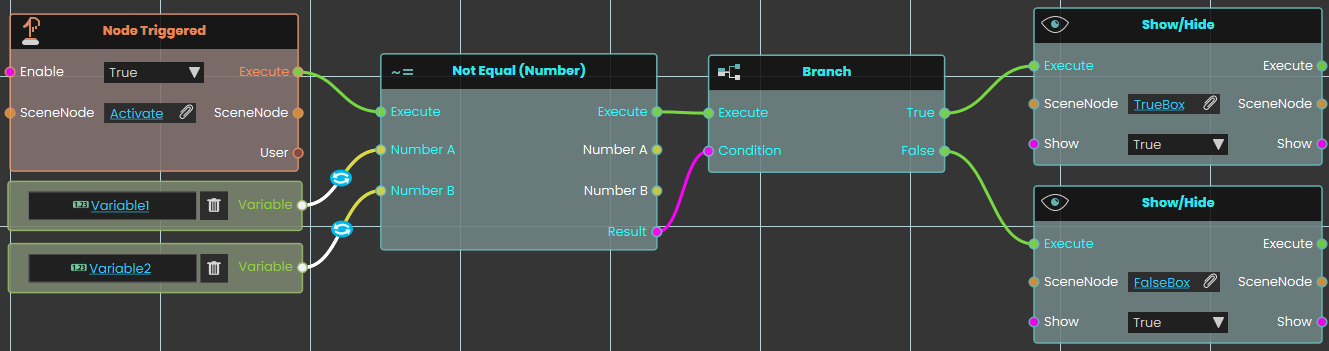
<div class="flex-shrink-0 flex flex-col relative items-end" id="bkmrk-%C2%A0-16"><div class="flex-shrink-0 flex flex-col relative items-end"><div><div class="pt-0"><div class="gizmo-bot-avatar flex h-8 w-8 items-center justify-center overflow-hidden rounded-full"><div class="relative p-1 rounded-sm flex items-center justify-center bg-token-main-surface-primary text-token-text-primary h-8 w-8"><div class="pointer-container" id="bkmrk-%C2%A0-20"><div class="pointer anim is-page-editable"><svg class="svg-icon" data-icon="link" role="presentation" viewbox="0 0 24 24" xmlns="http://www.w3.org/2000/svg"></svg><div class="input-group inline block"> <button class="button outline icon" data-clipboard-target="#pointer-url" title="Copy Link" type="button"><svg class="svg-icon" data-icon="copy" role="presentation" viewbox="0 0 24 24" xmlns="http://www.w3.org/2000/svg"></svg></button></div><svg class="svg-icon" data-icon="edit" role="presentation" viewbox="0 0 24 24" xmlns="http://www.w3.org/2000/svg"></svg></div></div></div></div></div></div></div></div>In this example, a **Not Equal** is used to compare the value of Variable1 with the value of Variable2 once the user triggers the object named Activate. The result of the comparison can be acquired through the Result port. We have connected this Result port to the Branch node, and if the result of the branch is True, the TrueBox will show; if the result is False, the FalseBox will show.

---