SceneNode \ Attributes
These event nodes watch an object and fire automatically the moment one of its attributes changes — so you can react when an attribute is added, edited, or removed without having to keep checking for it yourself. They pair naturally with the Set Node Attribute and Remove Node Attribute nodes, which are what usually make these events fire.
Each event watches the object you connect to its SceneNode input. When it fires, it hands you the object that changed along with the Category and Name of the attribute involved, so you know exactly what happened. Leave the Enable input on to keep watching, or turn it off to pause.
 Node Attribute Added
Fires automatically the moment a brand-new attribute is added to an object.
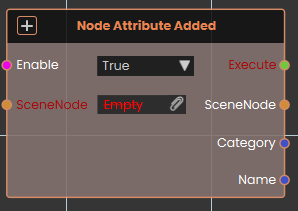
What it does
The Node Attribute Added event node continuously monitors the targeted SceneNode and activates whenever a completely new attribute is attached to it. This event is typically used in conjunction with Set Node Attribute nodes to trigger subsequent actions. Once activated, it outputs the affected SceneNode along with the specific Category and Name of the newly created attribute.
Inputs
| Port | Type | What to connect |
|---|---|---|
| Enable | True / false | Turns the watch on or off. It is on by default; set it to false to pause watching and back to true to resume. |
| SceneNode | Scene node | The object you want to watch. |
Outputs
| Port | Type | What you get |
|---|---|---|
| Execute | Trigger | Fires each time a new attribute is added to the object. Wire the next node here to react — this is what starts the chain. |
| SceneNode | Scene node | The object the change happened on. |
| Category | Text | The category the affected attribute belongs to. |
| Name | Text | The name of the affected attribute. |
Example
| SceneNode input | the <Forklift> object |
| Execute output | fires when an attribute is added to the forklift |
| SceneNode output | the <Forklift> object |
| Category output | Maintenance |
| Name output | inspected |
 Node Attribute Changed
Fires automatically whenever the value of one of an object’s attributes changes.
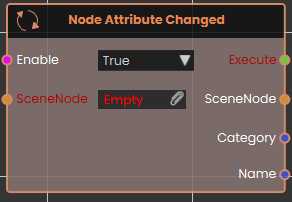
What it does
The Node Attribute Changed event node observes the targeted SceneNode and activates whenever the value of any of its existing attributes is modified. Once activated, the node outputs the affected SceneNode alongside the exact Category and Name of the altered attribute.
Inputs
| Port | Type | What to connect |
|---|---|---|
| Enable | True / false | Turns the watch on or off. It is on by default; set it to false to pause watching and back to true to resume. |
| SceneNode | Scene node | The object you want to watch. |
Outputs
| Port | Type | What you get |
|---|---|---|
| Execute | Trigger | Fires each time one of the object’s attributes changes value. Wire the next node here to react — this is what starts the chain. |
| SceneNode | Scene node | The object the change happened on. |
| Category | Text | The category the affected attribute belongs to. |
| Name | Text | The name of the affected attribute. |
Example
| SceneNode input | the <Forklift> object |
| Execute output | fires when one of the forklift’s attributes changes value |
| SceneNode output | the <Forklift> object |
| Category output | Maintenance |
| Name output | inspected |
 Node Attribute Removed
Fires automatically the moment an attribute is removed from an object.
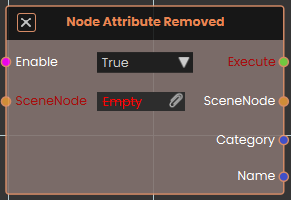
What it does
The Node Attribute Removed event node tracks the targeted SceneNode and activates the moment an existing attribute is deleted from the object. This event is typically used alongside the Remove Node Attribute node to initiate reactions to data clearance. Once activated, it outputs the affected SceneNode forward along with the specific Category and Name of the deleted attribute.
Inputs
| Port | Type | What to connect |
|---|---|---|
| Enable | True / false | Turns the watch on or off. It is on by default; set it to false to pause watching and back to true to resume. |
| SceneNode | Scene node | The object you want to watch. |
Outputs
| Port | Type | What you get |
|---|---|---|
| Execute | Trigger | Fires each time an attribute is removed from the object. Wire the next node here to react — this is what starts the chain. |
| SceneNode | Scene node | The object the change happened on. |
| Category | Text | The category the affected attribute belongs to. |
| Name | Text | The name of the affected attribute. |
Example
| SceneNode input | the <Forklift> object |
| Execute output | fires when an attribute is removed from the forklift |
| SceneNode output | the <Forklift> object |
| Category output | Maintenance |
| Name output | tempNote |