# SceneNode \ Dynamic Menu
###  Dynamic Menu Item Triggered
[](https://simlab-soft.com/help/uploads/images/gallery/2026-03/NdHimage.png)
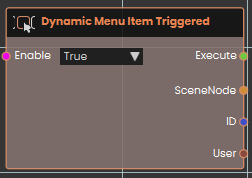
The **Dynamic Menu Item Triggered** event node acts as a universal listener, activating the moment a user interacts with *any* dynamic menu button within the VR scene. Upon execution, it outputs the specific **SceneNode** the menu is attached to, the **ID** of the clicked button, and the **User** who triggered it.
###  Dynamic Menu Item Triggered(ID)
[](https://simlab-soft.com/help/uploads/images/gallery/2026-03/pnVimage.png)
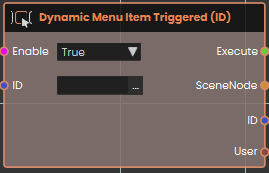
The **Dynamic Menu Item Triggered (ID)** event node activates only when a button with a specific **ID** is pressed. It ignores all other button interactions, allowing you to trigger a specific function
###  Dynamic Menu Item Triggered(Node + ID)
[](https://simlab-soft.com/help/uploads/images/gallery/2026-03/rOEimage.png)
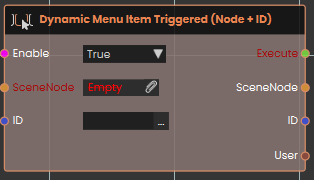
The **Dynamic Menu Item Triggered (Node + ID)** event node provides the most specific control by activating only when a button with a precise **ID** is pressed on a menu linked to a specific **SceneNode**. This prevents execution overlap by ensuring the logic only triggers for one unique button on one specific object.
**Example:**
[](https://simlab-soft.com/help/uploads/images/gallery/2026-03/Osbimage.png)
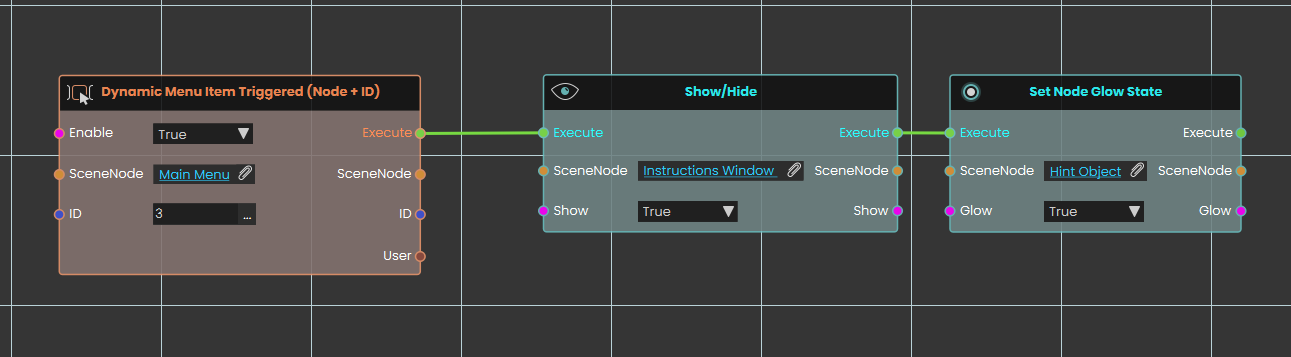
In this example, the **Dynamic Menu Item Triggered (Node + ID)** node is configured to act as a "Help" button. By setting the **SceneNode** to "Main Menu" and the **ID** to "3", the system listens exclusively for that exact button press on that specific menu object. Once the user clicks this button, the execution flow passes to a **Show/Hide** node configured to display an "Instructions Window" by setting its state to True. Immediately following this, the flow triggers a **Set Node Glow State** node, which applies a visual highlight to a designated "Hint Object" to guide the user.
###  Dynamic Menu Item Triggered(Node)
[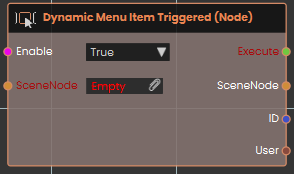](https://simlab-soft.com/help/uploads/images/gallery/2026-03/KW5image.png)
The **Dynamic Menu Item Triggered (Node)** event node activates only when a button is pressed on a menu attached to a designated **SceneNode**. This node isolates interactions to a single object, ensuring that the logic only runs for the menus linked to that specific item in the scene.
Dynamic Menu Triggered nodes are used in the following add-ons: