User \ Controller
 Attach To Hand


The Attach to Hand node enables the user to attach objects to specific parts of the hand in a VR environment by selecting the desired hand part. This node allows for precise placement of objects, such as tools or items, enhancing interactivity within the VR Experience. Once the attachment is configured, the object will remain in the chosen part of the hand during interactions.
Example

In this example, an Attach to Hand node is used to attach a syringe to the index finger once the "Hand Enter Node" event is triggered. The syringe is attached to the specified part of the hand automatically when the event occurs, enabling interaction with the object in the VR environment.
 Detach From Hand

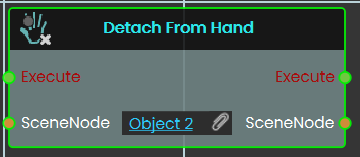
The Detach From Hand , detaches an object currently attached by the Attach To Hand response, so the object no more moves with the hand
 Trigger Beam

The Trigger Beam node enables the user to control the visibility of a beam coming out of the controller in the VR Experience, once the node is executed.
Example

In this example, a Trigger Beam node is used to hide the beam coming out of the controller once the object named Activate is triggered. When the event is triggered, the change is reflected during the VR Experience.
 Enable Controller Vibration
Makes a participant’s VR controller buzz, so you can give them a physical nudge of feedback during a scene.
What it does
When this node runs, the chosen user’s controller vibrates in their hand. You pick which hand buzzes, how strong the buzz feels, how fast it pulses, and how long it lasts. This is great for confirming an action, drawing attention to something, or signalling a mistake.
It only triggers a buzz — it doesn’t change anything about the user or the scene. The same user is passed straight back out, so you can keep chaining more user nodes after it.
Inputs
| Port | Type | What to connect |
|---|---|---|
| Execute | Trigger | Wire this from the previous node’s Execute output. |
| User | User | Choose who feels the buzz. Pick Host Only to vibrate just the host’s controller, or All Users to vibrate everyone’s. You can also connect a User coming from an earlier node. |
| Hand | Choice | Which controller buzzes: Right, Left, or Both. Choosing Both vibrates both controllers at once. |
| Strength | Choice | How intense the buzz feels: High, Medium, or Low. |
| Frequency | Choice | How fast the buzz pulses: High, Medium, or Low. |
| Duration | Number | How long the buzz lasts, in seconds (0 or more). For example, 1 is a one-second buzz. |
Outputs
| Port | Type | What you get |
|---|---|---|
| Execute | Trigger | Fires once the node has finished. |
| User | User | The same user you chose, passed along so you can connect more user nodes after this one. |
Example
| User input | Host Only |
| Hand input | Right |
| Strength input | High |
| Frequency input | Medium |
| Duration input | 1 (a one-second buzz) |
| User output | The host, ready to pass on to the next node |
Tips
- Use a short, strong buzz to confirm a correct action, and a longer or gentler one to warn of a mistake.
- Pick
Bothfor the Hand when you want a buzz the participant can’t miss.
 Disable Controller Vibration
Turns off the buzzing (haptic feedback) in a participant’s VR controller.
What it does
This node stops the vibration in the chosen hand’s controller for the user you pick. Use it to silence the controller after a buzz, or to make sure a controller stays quiet during a particular part of your scene.
You choose which participant it affects (the host only, or everyone) and which hand to quiet down — the right controller, the left controller, or both. It only controls the vibration; it doesn’t change anything else about the controller or the user, and the same user is passed straight back out so you can connect more user nodes after it.
Inputs
| Port | Type | What to connect |
|---|---|---|
| Execute | Trigger | Wire this from the previous node’s Execute output to run the node. |
| User | User | Chooses which participant to act on. Pick Host Only to quiet just the main user’s controller, or All Users to quiet everyone’s. |
| Hand | Choice | Which controller to turn off the vibration on: Right, Left, or Both. |
Outputs
| Port | Type | What you get |
|---|---|---|
| Execute | Trigger | Fires once the vibration has been turned off, so you can continue to the next node. |
| User | User | The same user you chose, passed along so you can chain more user nodes after this one. |
Example
| User input | Host Only |
| Hand input | Both |
| User output | The same host user, ready to connect to the next node |
Tips
- Pair this with the Enable Controller Vibration node: turn the buzzing on for a moment of feedback, then use this node to switch it back off.
- Choose Both when you want both controllers to stop at the same time, rather than adding two separate nodes for the left and right hands.