# User Name & ID

### [![Response_Cloud_USERID_Get.png](https://simlab-soft.com/help/uploads/images/gallery/2024-09/response-cloud-userid-get.png)](https://simlab-soft.com/help/uploads/images/gallery/2024-08/response-value-number-add.png) Get User ID
![Ceiling Node.png](https://simlab-soft.com/help/uploads/images/gallery/2024-09/scaled-1680-/xXdimage.png)

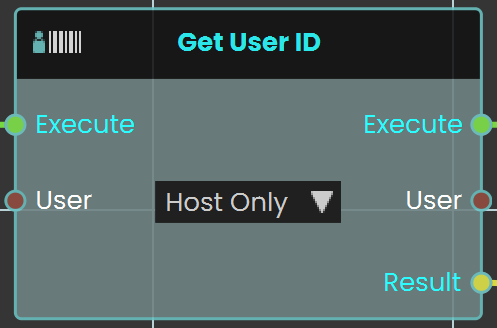
The **Get User ID node** is used to retrieve the unique identifier of the user interacting within the VR environment. This ID can be utilized for various purposes, such as tracking user actions or customizing experiences based on the user.

#### Example

![image.png](https://simlab-soft.com/help/uploads/images/gallery/2024-09/scaled-1680-/YZximage.png)

In this example, the **Get User ID node** is used to create a student attendance system. When the user triggers the Activate event, the "Get User ID" retrieves the Student ID number and stores it in the "`attendance_ID"` variable using the "Set Number Variable" node.

**Note:** To retrieve the User ID, the experience must be run from a **logged-in** account in SimLab VR Viewer.

---

[![Response_User_Name_Get.png](https://simlab-soft.com/help/uploads/images/gallery/2024-09/response-user-name-get.png)](https://simlab-soft.com/help/uploads/images/gallery/2024-08/response-value-number-add.png)<span style="color: rgb(34, 34, 34); font-size: 2.333em; font-weight: 400;"> </span><span style="color: rgb(34, 34, 34); font-size: 2.333em;">Get User Name</span>

![Ceiling Node.png](https://simlab-soft.com/help/uploads/images/gallery/2024-09/scaled-1680-/5fXimage.png)

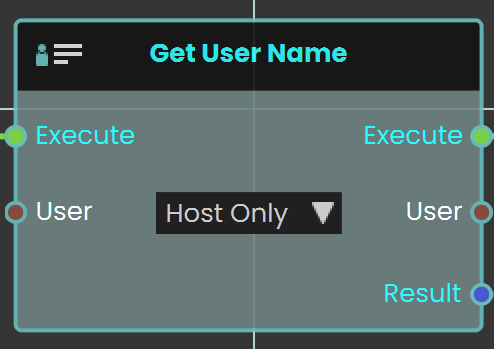
The **Get User Name node** is used to retrieve the name of the user interacting within the VR environment. This name can be utilized for various purposes, such as personalizing interactions or saving progress tied to a specific user.

<div class="mt-1 flex gap-3 empty:hidden -ml-2" id="bkmrk--9"><div class="items-center justify-start rounded-xl p-1 flex"><div class="flex items-center"><button aria-label="Read Aloud" class="rounded-lg text-token-text-secondary hover:bg-token-main-surface-secondary"><svg class="icon-md-heavy" fill="none" height="24" viewbox="0 0 24 24" width="24" xmlns="http://www.w3.org/2000/svg"></svg></button><button aria-label="Copy" class="rounded-lg text-token-text-secondary hover:bg-token-main-surface-secondary"><svg class="icon-md-heavy" fill="none" height="24" viewbox="0 0 24 24" width="24" xmlns="http://www.w3.org/2000/svg"></svg></button><button aria-label="Regenerate" class="rounded-lg text-token-text-secondary hover:bg-token-main-surface-secondary"><svg class="icon-md-heavy" fill="none" height="24" viewbox="0 0 24 24" width="24" xmlns="http://www.w3.org/2000/svg"></svg></button><div class="flex"><button aria-label="Good response" class="rounded-lg text-token-text-secondary hover:bg-token-main-surface-secondary"><svg class="icon-md-heavy" fill="none" height="24" viewbox="0 0 24 24" width="24" xmlns="http://www.w3.org/2000/svg"></svg></button><button aria-label="Bad response" class="rounded-lg text-token-text-secondary hover:bg-token-main-surface-secondary"><svg class="icon-md-heavy" fill="none" height="24" viewbox="0 0 24 24" width="24" xmlns="http://www.w3.org/2000/svg"></svg></button>  
</div><div class="flex items-center pb-0"><div class="[&_svg]:h-full [&_svg]:w-full icon-md h-4 w-4"><svg fill="none" height="24" viewbox="0 0 24 24" width="24" xmlns="http://www.w3.org/2000/svg"></svg>  
</div></div><button aria-expanded="false" aria-haspopup="menu" class="cursor-pointer h-[30px] rounded-md px-1 text-token-text-secondary hover:bg-token-main-surface-secondary" data-state="closed" id="bkmrk--18" type="button"></button></div></div></div>#### Example

![image.png](https://simlab-soft.com/help/uploads/images/gallery/2024-09/scaled-1680-/0aDimage.png)

In this example, the "Get User Name" node is used to create a student attendance system. When the user triggers the Activate event, the "Get User Name" retrieves the student's name and stores it in the `attendance_UserName` variable using the "Set String Variable" node.

  
**Note:** To retrieve the User Name, the experience must be run from a **logged-in** account in SimLab VR Viewer.

---