# Variable

### ![Events_Variable_Change.png](https://simlab-soft.com/help/uploads/images/gallery/2025-02/events-variable-change.png) Variable Changed

  
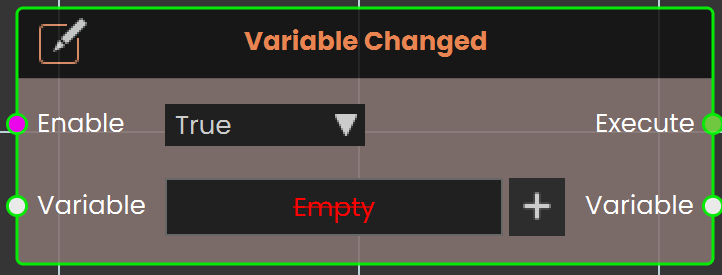
![Ceiling Node.png](https://simlab-soft.com/help/uploads/images/gallery/2025-02/scaled-1680-/yCFimage.png)The **Variable Changed** event activates when the value of a specified variable is modified. This event helps users detect real-time changes and trigger actions accordingly, enabling dynamic and responsive interactions within the VR Experience.

#### Example

[![image.png](https://simlab-soft.com/help/uploads/images/gallery/2025-02/scaled-1680-/VBwimage.png)](https://simlab-soft.com/help/uploads/images/gallery/2025-02/VBwimage.png)
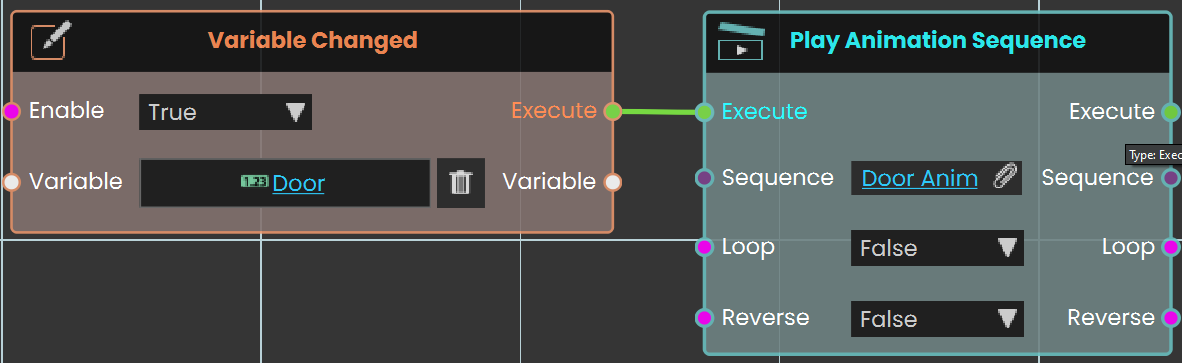
<div class="pointer-container" id="bkmrk-%C2%A0-0"><div class="pointer anim is-page-editable"><svg class="svg-icon" data-icon="link" role="presentation" viewbox="0 0 24 24" xmlns="http://www.w3.org/2000/svg"></svg><div class="input-group inline block"> <button class="button outline icon" data-clipboard-target="#pointer-url" title="Copy Link" type="button"><svg class="svg-icon" data-icon="copy" role="presentation" viewbox="0 0 24 24" xmlns="http://www.w3.org/2000/svg"></svg></button></div><svg class="svg-icon" data-icon="edit" role="presentation" viewbox="0 0 24 24" xmlns="http://www.w3.org/2000/svg"></svg></div></div>In this example, the **Variable Changed** event is set to monitor changes in the variable **Door**. When the value of this variable is modified, the event triggers the **Play Animation Sequence** node, which activates the **Door Anim** animation sequence.

<div class="mb-2 flex gap-3 empty:hidden -ml-2" id="bkmrk--0"><div class="items-center justify-start rounded-xl p-1 flex"><div class="flex items-center"><button aria-label="Read aloud" class="rounded-lg text-token-text-secondary hover:bg-token-main-surface-secondary" data-testid="voice-play-turn-action-button"><svg class="icon-md-heavy" fill="none" height="24" viewbox="0 0 24 24" width="24" xmlns="http://www.w3.org/2000/svg"></svg></button><button aria-label="Copy" class="rounded-lg text-token-text-secondary hover:bg-token-main-surface-secondary" data-testid="copy-turn-action-button"><svg class="icon-md-heavy" fill="none" height="24" viewbox="0 0 24 24" width="24" xmlns="http://www.w3.org/2000/svg"></svg></button><div class="flex"><button aria-label="Good response" class="rounded-lg text-token-text-secondary hover:bg-token-main-surface-secondary" data-testid="good-response-turn-action-button"><svg class="icon-md-heavy" fill="none" height="24" viewbox="0 0 24 24" width="24" xmlns="http://www.w3.org/2000/svg"></svg></button><button aria-label="Bad response" class="rounded-lg text-token-text-secondary hover:bg-token-main-surface-secondary" data-testid="bad-response-turn-action-button"><svg class="icon-md-heavy" fill="none" height="24" viewbox="0 0 24 24" width="24" xmlns="http://www.w3.org/2000/svg"></svg></button>  
</div><button aria-label="Edit in canvas" class="rounded-lg text-token-text-secondary hover:bg-token-main-surface-secondary"><svg class="icon-md-heavy" fill="none" height="24" viewbox="0 0 24 24" width="24" xmlns="http://www.w3.org/2000/svg"></svg></button><div class="flex items-center pb-0"><svg class="icon-md" fill="none" height="24" viewbox="0 0 24 24" width="24" xmlns="http://www.w3.org/2000/svg"></svg>  
</div><button aria-expanded="false" aria-haspopup="menu" class="cursor-pointer h-[30px] rounded-md px-1 text-token-text-secondary hover:bg-token-main-surface-secondary" data-state="closed" id="bkmrk--2" type="button"></button></div></div></div>