
SceneNode \ Grab
 Ignore grabbing
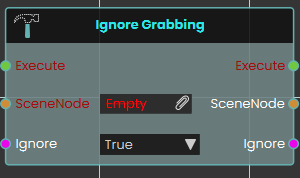
The Ignore Grabbing node explicitly prevents a specific 3D object from being picked up or interacted with by the user's hands during the VR experience. When activated, the node disables the grabbable state of the targeted SceneNode if set to True. This node is highly useful for complex models where you want to enforce realistic interactions by restricting grip points, allowing you to easily exclude certain parts of a grouped object from being grabbed without having to detach or separate the components from the main assembly.
Example:
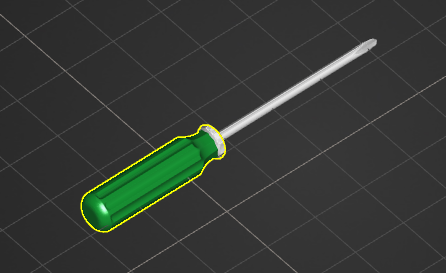
In this example, we configure a screwdriver so that the user can only pick it up by its handle, preventing them from grabbing it awkwardly by the metal rod or tip:
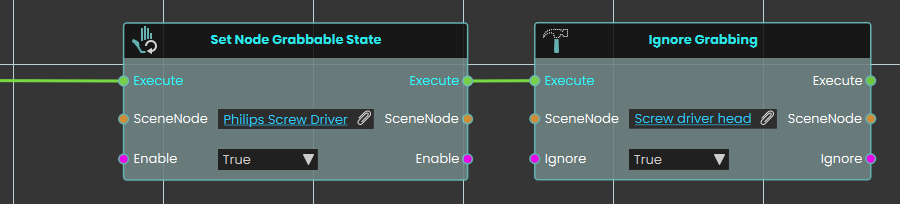
If Set Node Grabbable State node is used on the handle part of the screw driver alone, only the handle will move along with the grabbing hand, leaving the rest of the screw driver's assembly in place. Instead, Ignore Grabbing node should be used to exclude unwanted parts from being grabbed:
-
A Set Node Grabbable State node is activated to make the entire "Philips Screw Driver" parent group grabbable.
-
The execution flow immediately continues into an Ignore Grabbing node.
-
The specific "Screw driver head" object is assigned to the SceneNode input, and the Ignore boolean is set to True.
-
As a result, the metal tip is excluded from being a valid grab target, forcing the user to grab the tool properly by its handle while still ensuring the entire screwdriver assembly moves together as one cohesive object in the user's hand.
 Set Grabbable Sequence
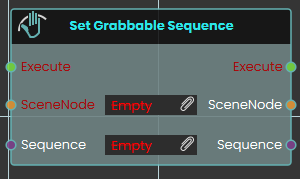
The Set Grabbable Sequence node makes a specific 3D object interactively grabbable by assigning an animation sequence to it during the VR experience. Once activated, the node evaluates the targeted SceneNode and attaches the specified Sequence input, defining exactly how the object animates when grabbed and manipulated by the user. This versatile node can be used to add a sequence, dynamically switch between different sequences on the fly, or completely remove an existing sequence from a grabbable object before continuing the logic flow.
Example:
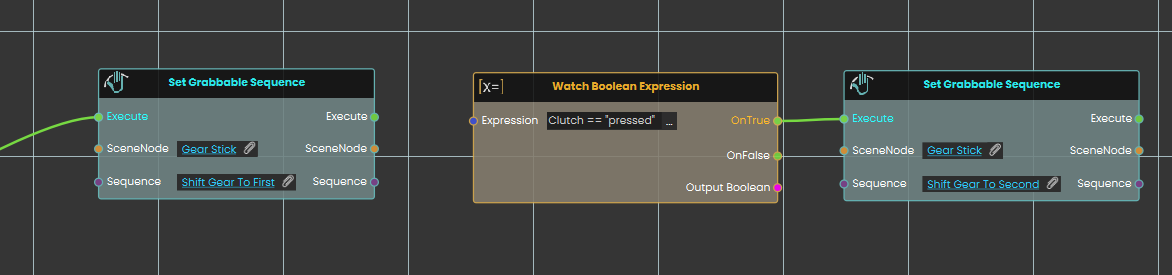
In this example, we use the Set Grabbable Sequence node to create a dynamic gear stick that changes states based on the user's interactions:
-
A Set Grabbable Sequence node is used to make a "Gear Stick" object grabbable and attaching an animation sequence that, when grabbed, shifts the gear to first.
-
A Watch Boolean Expression node continuously monitors a string variable named "Clutch".
-
When the "Clutch" variable is set to "pressed", the watch node passes its OnTrue execution path to a second Set Grabbable Sequence node, which changes the grabbable object's sequence to a "Shift Gear To Second" sequence.
Tip:
Using the Set Grabbable Sequence node without attaching a sequence will disable the grabbing state of an object.
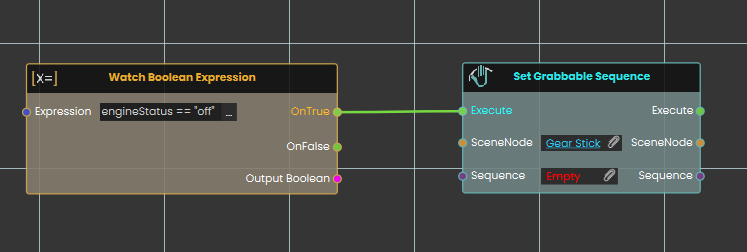
Here, another Watch Boolean Expression node is used to monitor a variable called "engineStatus". When the "engineStatus" variable is set to "off", it triggers a Set Grabbable Sequence node targeting the gear stick, but this time with no sequence attached (Empty). Leaving the sequence input empty completely disables the grabbing interaction, turning the gear stick back into a still, non-interactable object.
 Set Node grabbable State
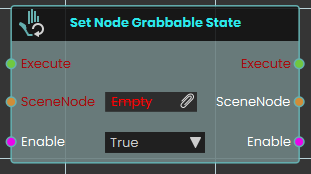
The Set Node Grabbable State node evaluates the boolean Enable input to determine the targeted SceneNode's grabbable status—making the object fully grabbable by the user if set to True, or disabling grab interactions entirely to make it a static object if set to False.
No Comments