
User
 User Entered Node
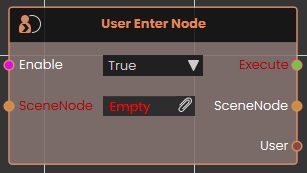
The User Enter Node event node continuously monitors the physical boundaries of a specific 3D object and activates the moment a user's avatar collides with or enters its volume. While enabled, it passes forward a reference to the specific User involved before continuing the logic flow. This functionality applies to all participants within multiplayer VR collaboration scenes.
 User Exited Node
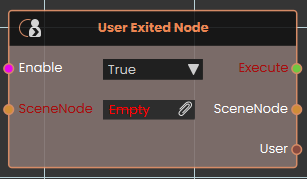
The User Exited Node event node tracks the physical boundaries of a specific 3D object and activates the exact moment a user's avatar stops colliding with or fully exits its volume. While enabled, the node watches the targeted SceneNode and triggers its output as soon as the user completely separates from the object, passing forward a reference to the specific User who left before continuing the execution logic. And like User Enter Node, it also applies to all participants within multiplayer VR collaboration scenes.
User Joined
Runs part of your scene whenever someone new joins your shared collaborative session.
What it does
When several people share the same VR/3D session, this node watches for new arrivals. Each time another person joins, the node fires on its own — you don’t need to trigger it from anywhere. It also hands you the person who just joined, so you can greet them, show them a welcome message, or update a list of who’s present.
The node only reacts to people joining; it doesn’t change anything about the session or the new arrival on its own. Whatever happens next is up to the steps you wire after it.
Inputs
| Port | Type | What to connect |
|---|---|---|
| Enable | True / false | While this is true the event is active and will react to people joining. Set it to false to switch the event off — for example, once your scene has finished its opening sequence. Leave it true to keep listening. |
Outputs
| Port | Type | What you get |
|---|---|---|
| Execute | Trigger | Fires each time someone new joins the session. Wire this to whatever you want to happen on a new arrival. |
| User | User | The person who just joined. Use this to greet them by name, give them a starting position, or add them to your list of participants. |
Example
| Enable input | true — keep listening for new arrivals throughout the session |
| Execute output | Fires when a new person joins; wire it to a step that shows a “Welcome!” pop-up |
| User output | The person who joined — for example <alice> |
Tips
- This node fires once per person each time someone joins. If three people join, it runs three separate times — once for each, with that person on the User output.
- Pair it with the matching “User Left” event to keep an up-to-date list of who is currently in the session.
QR Detected
Reacts the moment a QR code is spotted by the camera, and hands you the text stored inside it.
What it does
This node watches for QR codes in the scene’s view. As soon as one is detected, the node fires on its own — you don’t need to trigger it from another node. It then gives you the text that was encoded in the QR code, so you can react to it however you like (open a door, show a message, jump to another part of your training, and so on).
It keeps listening as long as it is switched on, firing again each time a QR code is read. It only reports what the code contains — it doesn’t change anything by itself.
Inputs
| Port | Type | What to connect |
|---|---|---|
| Enable | True / false | Switches the event on or off. While this is true the node is actively watching for QR codes; set it to false to turn the event off so it stops reacting. |
Outputs
| Port | Type | What you get |
|---|---|---|
| Execute | Trigger | Fires each time a QR code is detected. Wire this to whatever should happen next. |
| Message | Text | The text that was stored inside the detected QR code — for example a web address, a part number, or a station name. |
Example
| Enable input | true |
| Message output | Station-04 |
Tips
- Connect the Message text to a node that compares it against the codes you expect, so different QR codes can lead to different actions.
- Set Enable to
falseonce you no longer need to scan, so the node stops reacting to stray codes in view.
The User Exited Node event node tracks the physical boundaries of a specific 3D object and activates the exact moment a user's avatar stops colliding with or fully exits its volume. While enabled, the node watches the targeted SceneNode and triggers its output as soon as the user completely separates from the object, passing forward a reference to the specific User who left before continuing the execution logic. And like User Enter Node, it also applies to all participants within multiplayer VR collaboration scenes.
No Comments