
User \ Attributes
Every user in your experience can carry extra pieces of information called attributes — small named values you attach to a user and read back later. Attributes can also be grouped into named categories, which lets one user keep separate attributes that share a name. The nodes on this page let you add, read, check for, and remove attributes on a user, both on their own and inside a category.
Reading an attribute never changes it; setting or removing one changes only that single attribute and leaves everything else about the user untouched.
Get a user attribute
Get User Attribute (Number)
Reads a named attribute from a user and gives it back as a number.
What it does
Every user in your session can carry extra pieces of information called attributes, each one saved under a name you choose. This node looks for the attribute called the name you provide on the user you connect and hands its value back as a number. It only reads the user — it does not change the user or the attribute in any way.
The attribute should already exist and hold a number. If it is missing, or what is stored cannot be read as a number, the node stops with an error instead of giving you a result — so check with User Has Attribute first if you are not sure.
Inputs
| Port | Type | What to connect |
|---|---|---|
| Execute | Trigger | Wire this from the previous node’s Execute output. |
| User | User | The user you want to read the attribute from. If you leave this port unconnected, you can pick an option on the node itself: Host Only (the default) or All Users. |
| Attribute Name | Text | The name of the attribute you want to read. |
Outputs
| Port | Type | What you get |
|---|---|---|
| Execute | Trigger | Fires once the node has finished. |
| User | User | The same user you connected, passed straight through so you can keep using it. |
| Attribute Name | Text | The attribute name you provided, passed through. |
| Value | Number | The number stored in the attribute. |
Example
| User input | the <Trainee01> user |
| Attribute Name input | score |
| Value output | 85 |
Get User Attribute (Boolean)
Reads a named attribute from a user and gives it back as a true / false value.
What it does
Every user in your session can carry extra pieces of information called attributes, each one saved under a name you choose. This node looks for the attribute called the name you provide on the user you connect and hands its value back as a true / false value. It only reads the user — it does not change the user or the attribute in any way.
The attribute should already exist and hold a true / false value. If it is missing, or what is stored cannot be read as a true / false value, the node stops with an error instead of giving you a result — so check with User Has Attribute first if you are not sure.
Saved values of true, yes or on are read as true, and false, no or off are read as false.
Inputs
| Port | Type | What to connect |
|---|---|---|
| Execute | Trigger | Wire this from the previous node’s Execute output. |
| User | User | The user you want to read the attribute from. If you leave this port unconnected, you can pick an option on the node itself: Host Only (the default) or All Users. |
| Attribute Name | Text | The name of the attribute you want to read. |
Outputs
| Port | Type | What you get |
|---|---|---|
| Execute | Trigger | Fires once the node has finished. |
| User | User | The same user you connected, passed straight through so you can keep using it. |
| Attribute Name | Text | The attribute name you provided, passed through. |
| Result | True / false | The true / false value stored in the attribute. |
Example
| User input | the <Trainee01> user |
| Attribute Name input | certified |
| Result output | true |
Get User Attribute (SceneNode)
Reads a named attribute from a user and gives it back as a scene node.
What it does
Every user in your session can carry extra pieces of information called attributes, each one saved under a name you choose. This node looks for the attribute called the name you provide on the user you connect and hands its value back as a scene node. It only reads the user — it does not change the user or the attribute in any way.
The attribute should already exist and hold a scene node. If it is missing, you get an empty result rather than an error, so it is still worth checking with User Has Attribute first.
Inputs
| Port | Type | What to connect |
|---|---|---|
| Execute | Trigger | Wire this from the previous node’s Execute output. |
| User | User | The user you want to read the attribute from. |
| Attribute Name | Text | The name of the attribute you want to read. |
Outputs
| Port | Type | What you get |
|---|---|---|
| Execute | Trigger | Fires once the node has finished. |
| User | User | The same user you connected, passed straight through so you can keep using it. |
| Attribute Name | Text | The attribute name you provided, passed through. |
| Result | Scene node | The scene node stored in the attribute. |
Example
| User input | the <Trainee01> user |
| Attribute Name input | assignedStation |
| Result output | <WeldingStation> |
Get User Attribute (SceneState)
Reads a named attribute from a user and gives it back as a scene state.
What it does
Every user in your session can carry extra pieces of information called attributes, each one saved under a name you choose. This node looks for the attribute called the name you provide on the user you connect and hands its value back as a scene state. It only reads the user — it does not change the user or the attribute in any way.
The attribute should already exist and hold a scene state. If it is missing, you get an empty result rather than an error, so it is still worth checking with User Has Attribute first.
Inputs
| Port | Type | What to connect |
|---|---|---|
| Execute | Trigger | Wire this from the previous node’s Execute output. |
| User | User | The user you want to read the attribute from. |
| Attribute Name | Text | The name of the attribute you want to read. |
Outputs
| Port | Type | What you get |
|---|---|---|
| Execute | Trigger | Fires once the node has finished. |
| User | User | The same user you connected, passed straight through so you can keep using it. |
| Attribute Name | Text | The attribute name you provided, passed through. |
| Result | Scene state | The scene state stored in the attribute. |
Example
| User input | the <Trainee01> user |
| Attribute Name input | checkpoint |
| Result output | <Checkpoint2> |
Get User Attribute (Sequence)
Reads a named attribute from a user and gives it back as a sequence.
What it does
Every user in your session can carry extra pieces of information called attributes, each one saved under a name you choose. This node looks for the attribute called the name you provide on the user you connect and hands its value back as a sequence. It only reads the user — it does not change the user or the attribute in any way.
The attribute should already exist and hold a sequence. If it is missing, you get an empty result rather than an error, so it is still worth checking with User Has Attribute first.
Inputs
| Port | Type | What to connect |
|---|---|---|
| Execute | Trigger | Wire this from the previous node’s Execute output. |
| User | User | The user you want to read the attribute from. |
| Attribute Name | Text | The name of the attribute you want to read. |
Outputs
| Port | Type | What you get |
|---|---|---|
| Execute | Trigger | Fires once the node has finished. |
| User | User | The same user you connected, passed straight through so you can keep using it. |
| Attribute Name | Text | The attribute name you provided, passed through. |
| Result | Sequence | The sequence stored in the attribute. |
Example
| User input | the <Trainee01> user |
| Attribute Name input | introSequence |
| Result output | <SafetyBriefing> |
Set a user attribute
 Set User Attribute (String)

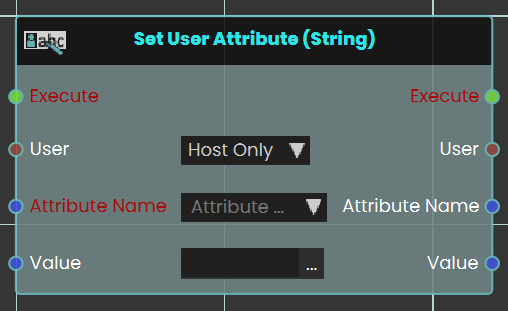
The Set User Attribute response enables user to set a value to an attribute by either typing in a string value in the value field or by attaching a value or a variable node to that port. Then once the response is executed, the variable value can be acquired through the Value port.
Example
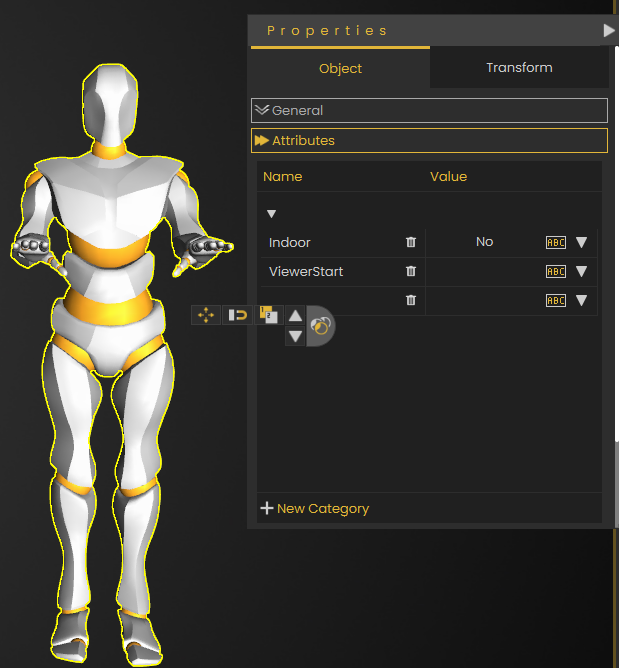
In this example, we added a String User Attribute called it Indoor with the value No
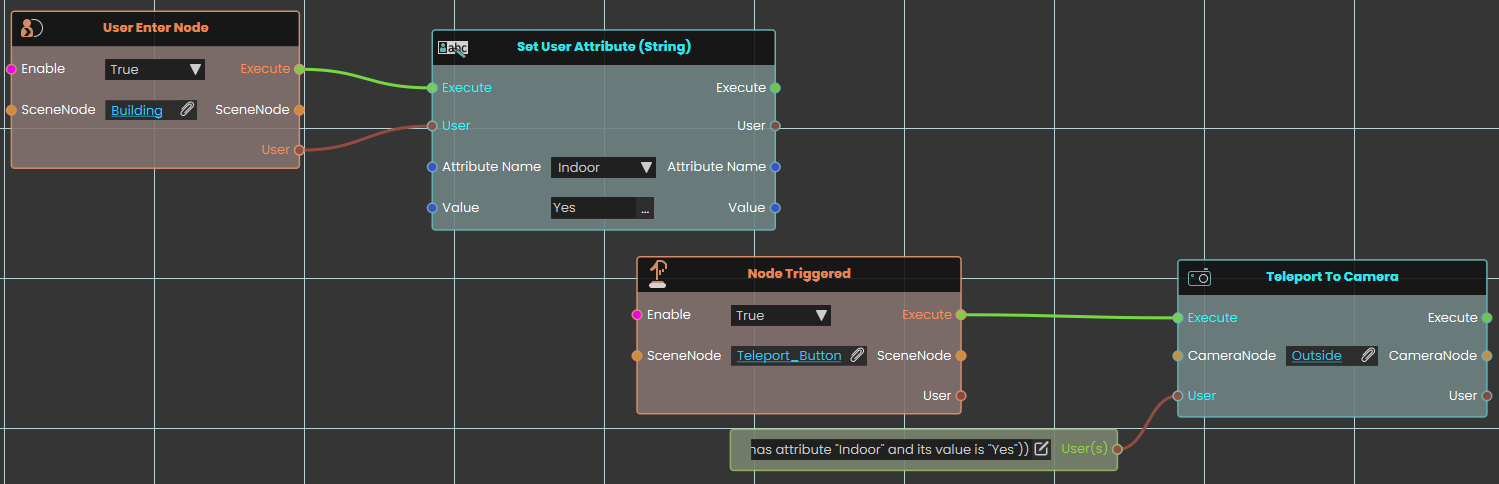
Once the user enters the object named Building, the Indoor attribute's value will be set to Yes, then when the object named Teleport Button is triggered, the user(s) with the attribute named Indoor and the value Yes will be teleported to the Outside CameraNode location.
Set User Attribute (Number)
Saves a number onto a user as a named attribute.
What it does
Every user in your session can carry extra pieces of information called attributes, each one saved under a name you choose. This node attaches the attribute called the name you provide to the user you connect and stores a number in it. If the user already has an attribute with that name, its value is replaced; if not, the attribute is created.
The value you provide is also sent straight back out, so you can keep using it further along.
Inputs
| Port | Type | What to connect |
|---|---|---|
| Execute | Trigger | Wire this from the previous node’s Execute output. |
| User | User | The user you want to add or change the attribute on. If you leave this port unconnected, you can pick an option on the node itself — Host Only (the default) or All Users, which saves the attribute on every user in the session. |
| Attribute Name | Text | The name to save the attribute under. |
| Value | Number | The number to store. |
Outputs
| Port | Type | What you get |
|---|---|---|
| Execute | Trigger | Fires once the node has finished. |
| User | User | The same user you connected, passed straight through so you can keep using it. |
| Attribute Name | Text | The attribute name you provided, passed through. |
| Value | Number | The same value you stored, passed through. |
Example
| User input | the <Trainee01> user |
| Attribute Name input | score |
| Value input | 85 |
Set User Attribute (Boolean)
Saves a true / false value onto a user as a named attribute.
What it does
Every user in your session can carry extra pieces of information called attributes, each one saved under a name you choose. This node attaches the attribute called the name you provide to the user you choose and stores a true / false value in it. If the user already has an attribute with that name, its value is replaced; if not, the attribute is created.
The value you provide is also sent straight back out, so you can keep using it further along.
Inputs
| Port | Type | What to connect |
|---|---|---|
| Execute | Trigger | Wire this from the previous node’s Execute output. |
| User | User | The user you want to add or change the attribute on. If you leave this port unconnected, you can pick an option on the node itself — Host Only (the default) or All Users, which saves the attribute on every user in the session. |
| Attribute Name | Text | The name to save the attribute under. |
| Value | True / false | The true / false value to store. |
Outputs
| Port | Type | What you get |
|---|---|---|
| Execute | Trigger | Fires once the node has finished. |
| User | User | The same user you connected, passed straight through so you can keep using it. |
| Attribute Name | Text | The attribute name you provided, passed through. |
| Value | True / false | The same value you stored, passed through. |
Example
| User input | the <Trainee01> user |
| Attribute Name input | certified |
| Value input | true |
Set User Attribute (SceneNode)
Saves a scene node onto a user as a named attribute.
What it does
Every user in your session can carry extra pieces of information called attributes, each one saved under a name you choose. This node attaches the attribute called the name you provide to the user you connect and stores a scene node in it. If the user already has an attribute with that name, its value is replaced; if not, the attribute is created.
The value you provide is also sent straight back out, so you can keep using it further along.
Inputs
| Port | Type | What to connect |
|---|---|---|
| Execute | Trigger | Wire this from the previous node’s Execute output. |
| User | User | The user you want to add or change the attribute on. |
| Attribute Name | Text | The name to save the attribute under. |
| Value | Scene node | The scene node to save a link to. |
Outputs
| Port | Type | What you get |
|---|---|---|
| Execute | Trigger | Fires once the node has finished. |
| User | User | The same user you connected, passed straight through so you can keep using it. |
| Attribute Name | Text | The attribute name you provided, passed through. |
| Value | Scene node | The same value you stored, passed through. |
Example
| User input | the <Trainee01> user |
| Attribute Name input | assignedStation |
| Value input | the <WeldingStation> object |
Set User Attribute (SceneState)
Saves a scene state onto a user as a named attribute.
What it does
Every user in your session can carry extra pieces of information called attributes, each one saved under a name you choose. This node attaches the attribute called the name you provide to the user you connect and stores a scene state in it. If the user already has an attribute with that name, its value is replaced; if not, the attribute is created.
The value you provide is also sent straight back out, so you can keep using it further along.
Inputs
| Port | Type | What to connect |
|---|---|---|
| Execute | Trigger | Wire this from the previous node’s Execute output. |
| User | User | The user you want to add or change the attribute on. |
| Attribute Name | Text | The name to save the attribute under. |
| Value | Scene state | The scene state to save a link to. |
Outputs
| Port | Type | What you get |
|---|---|---|
| Execute | Trigger | Fires once the node has finished. |
| User | User | The same user you connected, passed straight through so you can keep using it. |
| Attribute Name | Text | The attribute name you provided, passed through. |
| Value | Scene state | The same value you stored, passed through. |
Example
| User input | the <Trainee01> user |
| Attribute Name input | checkpoint |
| Value input | <Checkpoint2> |
Set User Attribute (Sequence)
Saves a sequence onto a user as a named attribute.
What it does
Every user in your session can carry extra pieces of information called attributes, each one saved under a name you choose. This node attaches the attribute called the name you provide to the user you connect and stores a sequence in it. If the user already has an attribute with that name, its value is replaced; if not, the attribute is created.
The value you provide is also sent straight back out, so you can keep using it further along.
Inputs
| Port | Type | What to connect |
|---|---|---|
| Execute | Trigger | Wire this from the previous node’s Execute output. |
| User | User | The user you want to add or change the attribute on. |
| Attribute Name | Text | The name to save the attribute under. |
| Value | Sequence | The sequence to save a link to. |
Outputs
| Port | Type | What you get |
|---|---|---|
| Execute | Trigger | Fires once the node has finished. |
| User | User | The same user you connected, passed straight through so you can keep using it. |
| Attribute Name | Text | The attribute name you provided, passed through. |
| Value | Sequence | The same value you stored, passed through. |
Example
| User input | the <Trainee01> user |
| Attribute Name input | introSequence |
| Value input | <SafetyBriefing> |
Check or remove a user attribute
User Has Attribute
Checks whether a user has an attribute with a given name.
What it does
This node looks at the user you connect and tells you whether they already have an attribute saved under the name you provide. You get back true if they do and false if they do not. It only checks — nothing on the user is changed.
It is handy to run before reading or changing an attribute, to be sure it is there.
Inputs
| Port | Type | What to connect |
|---|---|---|
| Execute | Trigger | Wire this from the previous node’s Execute output. |
| User | User | The user you want to check. |
| Attribute Name | Text | The name of the attribute to look for. |
Outputs
| Port | Type | What you get |
|---|---|---|
| Execute | Trigger | Fires once the node has finished. |
| User | User | The same user you connected, passed straight through so you can keep using it. |
| Attribute Name | Text | The attribute name you provided, passed through. |
| Result | True / false | True if the attribute exists, otherwise false. |
Example
| User input | the <Trainee01> user |
| Attribute Name input | certified |
| Result output | true — the attribute exists |
Remove User Attribute
Deletes a named attribute from a user.
What it does
This node removes the attribute saved under the name you provide from the user you connect. That one attribute and its value are deleted from the user; everything else about the user stays the same.
If the user has no attribute with that name, nothing happens.
Inputs
| Port | Type | What to connect |
|---|---|---|
| Execute | Trigger | Wire this from the previous node’s Execute output. |
| User | User | The user you want to remove the attribute from. |
| Attribute Name | Text | The name of the attribute to remove. |
Outputs
| Port | Type | What you get |
|---|---|---|
| Execute | Trigger | Fires once the node has finished. |
| User | User | The same user you connected, passed straight through so you can keep using it. |
| Attribute Name | Text | The attribute name you provided, passed through. |
Example
| User input | the <Trainee01> user |
| Attribute Name input | tempNote |
Get a user attribute in a category
Get User Attribute in Category (String)
Reads a named attribute kept in a category on a user and gives it back as a piece of text.
What it does
Every user in your session can carry extra pieces of information called attributes, each one saved under a name you choose. Attributes can also be grouped into named categories, so a single user can keep separate attributes that share a name in different categories. This node looks for the attribute called the name you provide inside the category you name, on the user you connect and hands its value back as a piece of text. It only reads the user — it does not change the user or the attribute in any way.
The attribute should already exist and hold text. If it is missing, you get an empty result rather than an error, so it is still worth checking with User Has Attribute In Category first.
Inputs
| Port | Type | What to connect |
|---|---|---|
| Execute | Trigger | Wire this from the previous node’s Execute output. |
| User | User | The user you want to read the attribute from. |
| Attribute Name | Text | The name of the attribute you want to read. |
| Category | Text | The name of the category the attribute is kept in. |
Outputs
| Port | Type | What you get |
|---|---|---|
| Execute | Trigger | Fires once the node has finished. |
| User | User | The same user you connected, passed straight through so you can keep using it. |
| Attribute Name | Text | The attribute name you provided, passed through. |
| Category | Text | The category name you provided, passed through. |
| Result | Text | The text stored in the attribute. |
Example
| User input | the <Trainee01> user |
| Attribute Name input | role |
| Category input | Training |
| Result output | Safety Officer |
Get User Attribute in Category (Number)
Reads a named attribute kept in a category on a user and gives it back as a number.
What it does
Every user in your session can carry extra pieces of information called attributes, each one saved under a name you choose. Attributes can also be grouped into named categories, so a single user can keep separate attributes that share a name in different categories. This node looks for the attribute called the name you provide inside the category you name, on the user you connect and hands its value back as a number. It only reads the user — it does not change the user or the attribute in any way.
The attribute should already exist and hold a number. If it is missing, or what is stored cannot be read as a number, the node stops with an error instead of giving you a result — so check with User Has Attribute In Category first if you are not sure.
Inputs
| Port | Type | What to connect |
|---|---|---|
| Execute | Trigger | Wire this from the previous node’s Execute output. |
| User | User | The user you want to read the attribute from. |
| Attribute Name | Text | The name of the attribute you want to read. |
| Category | Text | The name of the category the attribute is kept in. |
Outputs
| Port | Type | What you get |
|---|---|---|
| Execute | Trigger | Fires once the node has finished. |
| User | User | The same user you connected, passed straight through so you can keep using it. |
| Attribute Name | Text | The attribute name you provided, passed through. |
| Category | Text | The category name you provided, passed through. |
| Result | Number | The number stored in the attribute. |
Example
| User input | the <Trainee01> user |
| Attribute Name input | score |
| Category input | Training |
| Result output | 85 |
Get User Attribute in Category (Boolean)
Reads a named attribute kept in a category on a user and gives it back as a true / false value.
What it does
Every user in your session can carry extra pieces of information called attributes, each one saved under a name you choose. Attributes can also be grouped into named categories, so a single user can keep separate attributes that share a name in different categories. This node looks for the attribute called the name you provide inside the category you name, on the user you connect and hands its value back as a true / false value. It only reads the user — it does not change the user or the attribute in any way.
The attribute should already exist and hold a true / false value. If it is missing, or what is stored cannot be read as a true / false value, the node stops with an error instead of giving you a result — so check with User Has Attribute In Category first if you are not sure.
Saved values of true, yes or on are read as true, and false, no or off are read as false.
Inputs
| Port | Type | What to connect |
|---|---|---|
| Execute | Trigger | Wire this from the previous node’s Execute output. |
| User | User | The user you want to read the attribute from. |
| Attribute Name | Text | The name of the attribute you want to read. |
| Category | Text | The name of the category the attribute is kept in. |
Outputs
| Port | Type | What you get |
|---|---|---|
| Execute | Trigger | Fires once the node has finished. |
| User | User | The same user you connected, passed straight through so you can keep using it. |
| Attribute Name | Text | The attribute name you provided, passed through. |
| Category | Text | The category name you provided, passed through. |
| Result | True / false | The true / false value stored in the attribute. |
Example
| User input | the <Trainee01> user |
| Attribute Name input | certified |
| Category input | Training |
| Result output | true |
Get User Attribute in Category (SceneNode)
Reads a named attribute kept in a category on a user and gives it back as a scene node.
What it does
Every user in your session can carry extra pieces of information called attributes, each one saved under a name you choose. Attributes can also be grouped into named categories, so a single user can keep separate attributes that share a name in different categories. This node looks for the attribute called the name you provide inside the category you name, on the user you connect and hands its value back as a scene node. It only reads the user — it does not change the user or the attribute in any way.
The attribute should already exist and hold a scene node. If it is missing, you get an empty result rather than an error, so it is still worth checking with User Has Attribute In Category first.
Inputs
| Port | Type | What to connect |
|---|---|---|
| Execute | Trigger | Wire this from the previous node’s Execute output. |
| User | User | The user you want to read the attribute from. |
| Attribute Name | Text | The name of the attribute you want to read. |
| Category | Text | The name of the category the attribute is kept in. |
Outputs
| Port | Type | What you get |
|---|---|---|
| Execute | Trigger | Fires once the node has finished. |
| User | User | The same user you connected, passed straight through so you can keep using it. |
| Attribute Name | Text | The attribute name you provided, passed through. |
| Category | Text | The category name you provided, passed through. |
| Result | Scene node | The scene node stored in the attribute. |
Example
| User input | the <Trainee01> user |
| Attribute Name input | assignedStation |
| Category input | Training |
| Result output | the <WeldingStation> object |
Get User Attribute in Category (SceneState)
Reads a named attribute kept in a category on a user and gives it back as a scene state.
What it does
Every user in your session can carry extra pieces of information called attributes, each one saved under a name you choose. Attributes can also be grouped into named categories, so a single user can keep separate attributes that share a name in different categories. This node looks for the attribute called the name you provide inside the category you name, on the user you connect and hands its value back as a scene state. It only reads the user — it does not change the user or the attribute in any way.
The attribute should already exist and hold a scene state. If it is missing, you get an empty result rather than an error, so it is still worth checking with User Has Attribute In Category first.
Inputs
| Port | Type | What to connect |
|---|---|---|
| Execute | Trigger | Wire this from the previous node’s Execute output. |
| User | User | The user you want to read the attribute from. |
| Attribute Name | Text | The name of the attribute you want to read. |
| Category | Text | The name of the category the attribute is kept in. |
Outputs
| Port | Type | What you get |
|---|---|---|
| Execute | Trigger | Fires once the node has finished. |
| User | User | The same user you connected, passed straight through so you can keep using it. |
| Attribute Name | Text | The attribute name you provided, passed through. |
| Category | Text | The category name you provided, passed through. |
| Result | Scene state | The scene state stored in the attribute. |
Example
| User input | the <Trainee01> user |
| Attribute Name input | checkpoint |
| Category input | Training |
| Result output | <Checkpoint2> |
Get User Attribute in Category (Sequence)
Reads a named attribute kept in a category on a user and gives it back as a sequence.
What it does
Every user in your session can carry extra pieces of information called attributes, each one saved under a name you choose. Attributes can also be grouped into named categories, so a single user can keep separate attributes that share a name in different categories. This node looks for the attribute called the name you provide inside the category you name, on the user you connect and hands its value back as a sequence. It only reads the user — it does not change the user or the attribute in any way.
The attribute should already exist and hold a sequence. If it is missing, you get an empty result rather than an error, so it is still worth checking with User Has Attribute In Category first.
Inputs
| Port | Type | What to connect |
|---|---|---|
| Execute | Trigger | Wire this from the previous node’s Execute output. |
| User | User | The user you want to read the attribute from. |
| Attribute Name | Text | The name of the attribute you want to read. |
| Category | Text | The name of the category the attribute is kept in. |
Outputs
| Port | Type | What you get |
|---|---|---|
| Execute | Trigger | Fires once the node has finished. |
| User | User | The same user you connected, passed straight through so you can keep using it. |
| Attribute Name | Text | The attribute name you provided, passed through. |
| Category | Text | The category name you provided, passed through. |
| Result | Sequence | The sequence stored in the attribute. |
Example
| User input | the <Trainee01> user |
| Attribute Name input | introSequence |
| Category input | Training |
| Result output | <SafetyBriefing> |
Set a user attribute in a category
Set User Attribute in Category (String)
Saves a piece of text into a category on a user as a named attribute.
What it does
Every user in your session can carry extra pieces of information called attributes, each one saved under a name you choose. Attributes can also be grouped into named categories, so a single user can keep separate attributes that share a name in different categories. This node attaches the attribute called the name you provide, inside the category you name, to the user you connect and stores a piece of text in it. If that category already has an attribute with that name, its value is replaced; if not, the attribute is created.
The value you provide is also sent straight back out, so you can keep using it further along.
Inputs
| Port | Type | What to connect |
|---|---|---|
| Execute | Trigger | Wire this from the previous node’s Execute output. |
| User | User | The user you want to add or change the attribute on. |
| Attribute Name | Text | The name to save the attribute under. |
| Category | Text | The name of the category to keep the attribute in. |
| Value | Text | The text to store. |
Outputs
| Port | Type | What you get |
|---|---|---|
| Execute | Trigger | Fires once the node has finished. |
| User | User | The same user you connected, passed straight through so you can keep using it. |
| Attribute Name | Text | The attribute name you provided, passed through. |
| Category | Text | The category name you provided, passed through. |
| Value | Text | The same value you stored, passed through. |
Example
| User input | the <Trainee01> user |
| Attribute Name input | role |
| Category input | Training |
| Value input | Safety Officer |
Set User Attribute in Category (Number)
Saves a number into a category on a user as a named attribute.
What it does
Every user in your session can carry extra pieces of information called attributes, each one saved under a name you choose. Attributes can also be grouped into named categories, so a single user can keep separate attributes that share a name in different categories. This node attaches the attribute called the name you provide, inside the category you name, to the user you connect and stores a number in it. If that category already has an attribute with that name, its value is replaced; if not, the attribute is created.
The value you provide is also sent straight back out, so you can keep using it further along.
Inputs
| Port | Type | What to connect |
|---|---|---|
| Execute | Trigger | Wire this from the previous node’s Execute output. |
| User | User | The user you want to add or change the attribute on. |
| Attribute Name | Text | The name to save the attribute under. |
| Category | Text | The name of the category to keep the attribute in. |
| Value | Number | The number to store. |
Outputs
| Port | Type | What you get |
|---|---|---|
| Execute | Trigger | Fires once the node has finished. |
| User | User | The same user you connected, passed straight through so you can keep using it. |
| Attribute Name | Text | The attribute name you provided, passed through. |
| Category | Text | The category name you provided, passed through. |
| Value | Number | The same value you stored, passed through. |
Example
| User input | the <Trainee01> user |
| Attribute Name input | score |
| Category input | Training |
| Value input | 85 |
Set User Attribute in Category (Boolean)
Saves a true / false value into a category on a user as a named attribute.
What it does
Every user in your session can carry extra pieces of information called attributes, each one saved under a name you choose. Attributes can also be grouped into named categories, so a single user can keep separate attributes that share a name in different categories. This node attaches the attribute called the name you provide, inside the category you name, to the user you connect and stores a true / false value in it. If that category already has an attribute with that name, its value is replaced; if not, the attribute is created.
The value you provide is also sent straight back out, so you can keep using it further along.
Inputs
| Port | Type | What to connect |
|---|---|---|
| Execute | Trigger | Wire this from the previous node’s Execute output. |
| User | User | The user you want to add or change the attribute on. |
| Attribute Name | Text | The name to save the attribute under. |
| Category | Text | The name of the category to keep the attribute in. |
| Value | True / false | The true / false value to store. |
Outputs
| Port | Type | What you get |
|---|---|---|
| Execute | Trigger | Fires once the node has finished. |
| User | User | The same user you connected, passed straight through so you can keep using it. |
| Attribute Name | Text | The attribute name you provided, passed through. |
| Category | Text | The category name you provided, passed through. |
| Value | True / false | The same value you stored, passed through. |
Example
| User input | the <Trainee01> user |
| Attribute Name input | certified |
| Category input | Training |
| Value input | true |
Set User Attribute in Category (SceneNode)
Saves a scene node into a category on a user as a named attribute.
What it does
Every user in your session can carry extra pieces of information called attributes, each one saved under a name you choose. Attributes can also be grouped into named categories, so a single user can keep separate attributes that share a name in different categories. This node attaches the attribute called the name you provide, inside the category you name, to the user you connect and stores a scene node in it. If that category already has an attribute with that name, its value is replaced; if not, the attribute is created.
The value you provide is also sent straight back out, so you can keep using it further along.
Inputs
| Port | Type | What to connect |
|---|---|---|
| Execute | Trigger | Wire this from the previous node’s Execute output. |
| User | User | The user you want to add or change the attribute on. |
| Attribute Name | Text | The name to save the attribute under. |
| Category | Text | The name of the category to keep the attribute in. |
| Value | Scene node | The scene node to save a link to. |
Outputs
| Port | Type | What you get |
|---|---|---|
| Execute | Trigger | Fires once the node has finished. |
| User | User | The same user you connected, passed straight through so you can keep using it. |
| Attribute Name | Text | The attribute name you provided, passed through. |
| Category | Text | The category name you provided, passed through. |
| Value | Scene node | The same value you stored, passed through. |
Example
| User input | the <Trainee01> user |
| Attribute Name input | assignedStation |
| Category input | Training |
| Value input | the <WeldingStation> object |
Set User Attribute in Category (SceneState)
Saves a scene state into a category on a user as a named attribute.
What it does
Every user in your session can carry extra pieces of information called attributes, each one saved under a name you choose. Attributes can also be grouped into named categories, so a single user can keep separate attributes that share a name in different categories. This node attaches the attribute called the name you provide, inside the category you name, to the user you connect and stores a scene state in it. If that category already has an attribute with that name, its value is replaced; if not, the attribute is created.
The value you provide is also sent straight back out, so you can keep using it further along.
Inputs
| Port | Type | What to connect |
|---|---|---|
| Execute | Trigger | Wire this from the previous node’s Execute output. |
| User | User | The user you want to add or change the attribute on. |
| Attribute Name | Text | The name to save the attribute under. |
| Category | Text | The name of the category to keep the attribute in. |
| Value | Scene state | The scene state to save a link to. |
Outputs
| Port | Type | What you get |
|---|---|---|
| Execute | Trigger | Fires once the node has finished. |
| User | User | The same user you connected, passed straight through so you can keep using it. |
| Attribute Name | Text | The attribute name you provided, passed through. |
| Category | Text | The category name you provided, passed through. |
| Value | Scene state | The same value you stored, passed through. |
Example
| User input | the <Trainee01> user |
| Attribute Name input | checkpoint |
| Category input | Training |
| Value input | <Checkpoint2> |
Set User Attribute in Category (Sequence)
Saves a sequence into a category on a user as a named attribute.
What it does
Every user in your session can carry extra pieces of information called attributes, each one saved under a name you choose. Attributes can also be grouped into named categories, so a single user can keep separate attributes that share a name in different categories. This node attaches the attribute called the name you provide, inside the category you name, to the user you connect and stores a sequence in it. If that category already has an attribute with that name, its value is replaced; if not, the attribute is created.
The value you provide is also sent straight back out, so you can keep using it further along.
Inputs
| Port | Type | What to connect |
|---|---|---|
| Execute | Trigger | Wire this from the previous node’s Execute output. |
| User | User | The user you want to add or change the attribute on. |
| Attribute Name | Text | The name to save the attribute under. |
| Category | Text | The name of the category to keep the attribute in. |
| Value | Sequence | The sequence to save a link to. |
Outputs
| Port | Type | What you get |
|---|---|---|
| Execute | Trigger | Fires once the node has finished. |
| User | User | The same user you connected, passed straight through so you can keep using it. |
| Attribute Name | Text | The attribute name you provided, passed through. |
| Category | Text | The category name you provided, passed through. |
| Value | Sequence | The same value you stored, passed through. |
Example
| User input | the <Trainee01> user |
| Attribute Name input | introSequence |
| Category input | Training |
| Value input | <SafetyBriefing> |
Check, list, or remove attributes in a category
User Has Attribute In Category
Checks whether a user has an attribute with a given name inside a category.
What it does
This node looks at the user you connect and tells you whether they already have an attribute saved under the name you provide inside the category you name. You get back true if they do and false if they do not. It only checks — nothing on the user is changed.
Inputs
| Port | Type | What to connect |
|---|---|---|
| Execute | Trigger | Wire this from the previous node’s Execute output. |
| User | User | The user you want to check. |
| Attribute Name | Text | The name of the attribute to look for. |
| Category | Text | The name of the category to look in. |
Outputs
| Port | Type | What you get |
|---|---|---|
| Execute | Trigger | Fires once the node has finished. |
| User | User | The same user you connected, passed straight through so you can keep using it. |
| Attribute Name | Text | The attribute name you provided, passed through. |
| Category | Text | The category name you provided, passed through. |
| Result | True / false | True if the attribute exists in that category, otherwise false. |
Example
| User input | the <Trainee01> user |
| Attribute Name input | certified |
| Category input | Training |
| Result output | true — the attribute exists |
Get User Attribute Category Names
Lists the names of the attributes kept inside a category on a user.
What it does
Attributes on a user can be grouped into named categories. This node looks at the user you connect and gives you back the names of the attributes that are stored inside the category you name. The names come back as a list of separate pieces of text, so you can connect a node that steps through a list to handle them one at a time. It only reads the user — nothing is changed.
Inputs
| Port | Type | What to connect |
|---|---|---|
| Execute | Trigger | Wire this from the previous node’s Execute output. |
| User | User | The user you want to look at. |
| Category | Text | The name of the category whose attribute names you want. |
Outputs
| Port | Type | What you get |
|---|---|---|
| Execute | Trigger | Fires once the node has finished. |
| User | User | The same user you connected, passed straight through so you can keep using it. |
| Category | Text | The category name you provided, passed through. |
| Result | Text | The names of the attributes found in that category, returned as a list of separate pieces of text. Connect a node that steps through a list to read them one by one. |
Example
| User input | the <Trainee01> user |
| Category input | Training |
| Result output | a list of names — e.g. certified, score, assignedStation |
Remove User Attribute From Category
Deletes a named attribute that is kept in a category on a user.
What it does
This node removes the attribute saved under the name you provide, inside the category you name, from the user you connect. That one attribute and its value are deleted from that category; everything else about the user stays the same.
If no attribute with that name exists in the category, nothing happens.
Inputs
| Port | Type | What to connect |
|---|---|---|
| Execute | Trigger | Wire this from the previous node’s Execute output. |
| User | User | The user you want to remove the attribute from. |
| Attribute Name | Text | The name of the attribute to remove. |
| Category | Text | The name of the category to remove it from. |
Outputs
| Port | Type | What you get |
|---|---|---|
| Execute | Trigger | Fires once the node has finished. |
| User | User | The same user you connected, passed straight through so you can keep using it. |
| Attribute Name | Text | The attribute name you provided, passed through. |
| Category | Text | The category name you provided, passed through. |
Example
| User input | the <Trainee01> user |
| Attribute Name input | tempNote |
| Category input | Training |
No Comments